Enjoy the journey of discovery.
Your lab protocols, guided by voice.
Draft a protocol on your own or with your AI agent, review the steps in Workspace, and follow them hands-free at the bench.
Connect your AI agent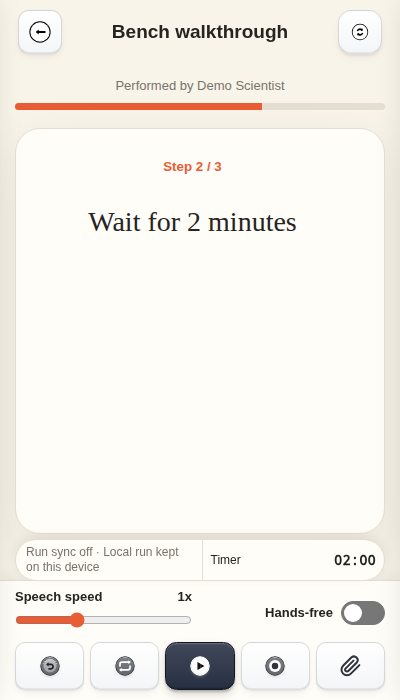
Combine modules into a protocol.
Pick the Step modules you need for today’s experiment, put them in order, and save a protocol you can run. The original modules stay ready to reuse.
Try it in WorkspaceRecord observations as you go.
- Capture notes during a step
- Record a voice note, take a photo, or add a sketch or file. Each item stays with the step where you added it.
- Review the run report
- The report keeps the protocol snapshot, planned and actual step times, any ratings, and your notes and attachments.
- Find the run on your calendar
- The in-app calendar updates the scheduled entry with the actual start and finish times. Tap the completed entry to reopen the report.
Give your agent the Listen Step Skill.
The Skill teaches your agent how to prepare Listen Step protocols and reusable modules. Review what it creates before putting it to work.
Import files manually, or approve an agent’s cloud import with eligible Pro or Pro Max access.
Explore Listen Step.
- Manual
Build, import, and run your first protocol.
- Library
Browse research references and planning templates.
- Step modules
Browse CGT research methods and download modules in Chinese.
- Recipes
Find formulations from the literature.
- Lab calculators
Run common calculations in your browser.
- Pricing
Compare plans, storage, and subscription terms.
See how Listen Step compares with other tools
Where Listen Step fits
Listen Step connects protocol preparation with work at the bench. Build a protocol from reusable modules, choose alternatives before a run, follow steps by voice, scale a mix table, and keep the resulting timing, photos and audio notes in a run report. Optional cloud sync and groups connect that work across devices and collaborators.
Use the Android app for hands-free execution and the PC Workspace for protocol and module editing, PDF extraction and experiment history. Android uses on-device speech recognition; voice support in the web workspace depends on the browser.
Compare by workflow
Checked against current Listen Step features and the official product documentation linked below. “Not documented” means the specific workflow was not confirmed in the reviewed sources; it does not mean a product cannot support it. Features vary by version, plan and deployment.
Strength · bold greenLimitation or requirement · underlined redNot confirmed · neutral
Scroll horizontally to compare all five products.
| Workflow | Listen Step | protocols.io | LabTwin | Benchling | eLabFTW |
|---|---|---|---|---|---|
| Primary focus | Prepare protocols and modules, execute hands-free, and retain run records. | Author, share and publish protocols with versions, DOIs and run records. | Voice capture and procedure guidance connected to laboratory systems. | Connected experiment documentation, scientific data and collaboration. | Experiment records, resources, templates and lab traceability. |
| Reusable content | Editable modules, shared tables, protocol combination and alternative steps selected before insertion. | Structured protocol editor and versioned methods. | Voice-friendly procedures and data prompts. | Notebook templates, sub-templates and template collections. | Experiment templates; insert content from multiple templates. |
| PDF preparation | AI extraction of complete article protocols, article modules or manufacturer-manual modules. Online processing; review before use. | The same PDF-to-module extraction workflow is not documented. | Protocol converter listed as a prototype; the same PDF-to-module workflow is not documented. | The same PDF-to-module extraction workflow is not documented. | The same PDF-to-module extraction workflow is not documented. |
| At the bench | Step read-aloud, next/back/repeat voice commands, countdowns, pause/resume and per-step timing. | Start, pause, resume and save protocol runs. | Verbal and visual step guidance, voice data entry, multiple timers and reminders. | Notebook entries, tables and checklists for recording experiments. | Experiment steps, status fields, tables and attachments. |
| Mix calculations | Mix × N scales a numeric final table column with a 10% reserve; scaled values enter the run record. | The same live Mix × N workflow is not documented. | Tables are documented; the same live Mix × N workflow is not documented. | Notebook tables support formulas; the same execution-linked scaling is not documented. | Tables are documented; the same execution-linked scaling is not documented. |
| Run evidence & export | Protocol snapshots, planned vs. actual timing, photos, audio notes and mix calculations; Word-compatible export and sharing. | Saved protocol-run records; protocol export for offline reference. | Voice notes, pictures, structured reports and ELN/LIMS data exchange. | Rich notebook entries, attachments, version history and data export. | Rich entries, attachments, revisions and export formats including ELN. |
| Planning & collaboration | Recurring protocol schedules and run status; optional sync; group execution-only or editable grants and permanent gifts. | Protocol sharing and collaborative editing; public publishing and private sharing options. | Timers and reminders; API integration with ELNs, LIMS and instruments. | Co-editing, comments, task assignments and role-based access. | Team/group permissions; resource bookings can link to experiments. |
| Offline & connected features | Local Android editing and run records, with on-device speech. Sign-in, access checks, cloud sync, group authorization and AI PDF extraction need connectivity. | Exported protocols can be read offline; live publishing and collaboration are connected workflows. | Connected voice and integration workflows; offline behavior is not specified in the reviewed page. | Cloud-based notebook and collaboration. | A separate desktop app records offline and uploads to an eLabFTW instance later. |
| Access & setup | Android app and PC browser workspace. Account and feature access apply; check the app for current availability. | Account-based web protocol workspace and publishing. | iOS/Android support; contact the provider for deployment. | Cloud platform; a free academic plan includes Notebook and Molecular Biology. | Open-source ELN with self-hosting or hosted service options. |
Choose around your workflow
- Listen Step: prepare and combine methods, then follow a timed protocol with voice controls and a run report. Cloud features are optional; AI-generated drafts need review.
- protocols.io: publish and cite a method, preserve versions, and share it with a research community.
- LabTwin: capture scientific data by voice and connect bench work with ELNs, LIMS and instruments.
- Benchling and eLabFTW: organize research records and team access. Their data-management and traceability workflows can complement exported Listen Step reports.
Official comparison sources · checked 29 October 2026
- protocols.io: Editor, sharing and export help; Run, pause and save a protocol; Publishing and DOIs.
- LabTwin: Voice capture, protocol guidance, integrations and prototype features.
- Benchling: Notebook features; Academic plan; Templates and sub-templates; Tables and attachments; Notebook export.
- eLabFTW: Experiments and templates; Scheduler; Offline desktop app; Import and export.
Product names belong to their respective owners. This comparison describes workflows, not a certification or endorsement.